ChatGPT Space Rolls Out to Plus: Projects Diff & Limits
OpenAI is rolling out ChatGPT Space to Plus ($20/mo) users 18+. See how it replaces Library, differs from Projects, and handles sharing and training.
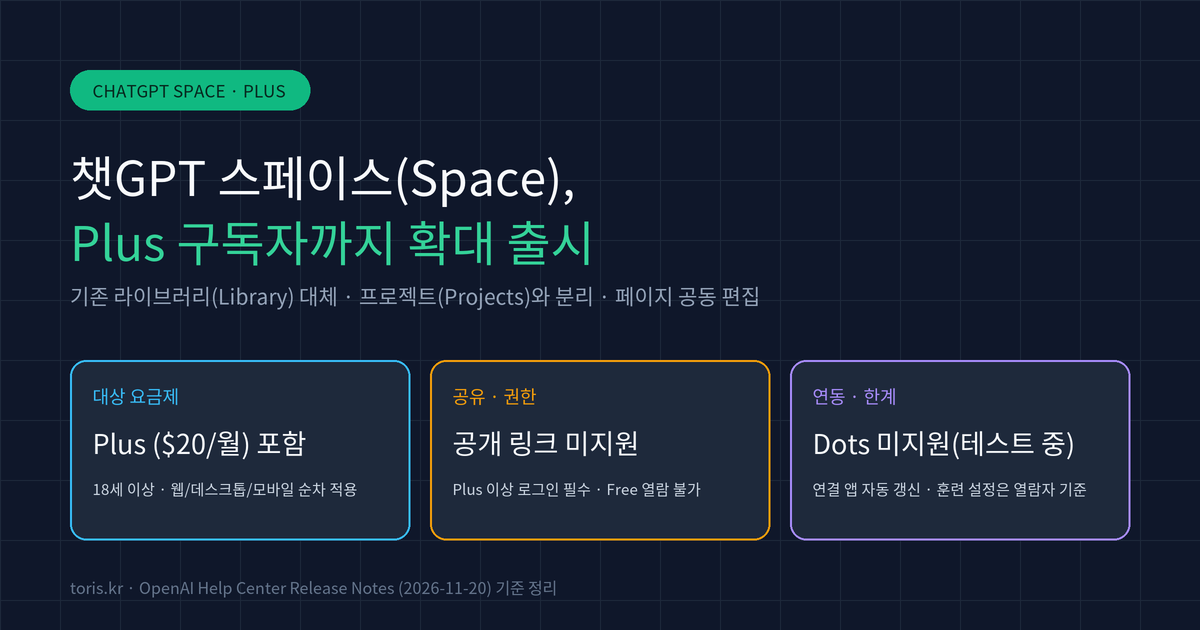
Q. Is ChatGPT Space now available to ChatGPT Plus subscribers? Yes. In its November 20, 2026 release notes, OpenAI announced that ChatGPT Space is rolling out globally to Plus ($20/month) users ages 18 and older. It replaces Library in the sidebar and lets you create and collaboratively edit pages across web, desktop apps, iOS, and Android.
⚠️ Accuracy guardrail: This guide is based on official OpenAI Help Center documentation and press reports as of November 23, 2026. The Plus rollout is gradual by account, so Space may not appear immediately even after updating the app. Any additional fee or message-limit details not published in OpenAI's official notes remain unconfirmed.
30-second summary
- Plus rollout: Starting November 20, 2026, ChatGPT Space—previously limited to Pro, Business, and Enterprise—began rolling out globally to eligible Plus ($20/month) users ages 18 and older.
- Replaces Library, keeps Projects separate: Space replaces the existing
Libraryview in the sidebar, whileProjects(chats, files, and project instructions) remain separate. - Sharing and access limits: Real-time collaboration is supported, but public links are not available and viewers must be signed in to a Plus, Pro, Business, or Enterprise account with Space access (Free users cannot open shared pages).
- Dots & training caveats: Plus subscribers cannot use
Dotsagents inside Space yet (testing with a small Plus group began Nov 19), and shared page content is governed by each collaborator's own Memory and model-training settings.
What ChatGPT Space is and why the Plus rollout matters
ChatGPT Space is a collaborative hub where you organize editable Pages, slides, images, and uploaded files generated with ChatGPT and work on them with others.
First introduced in late September 2026 for Pro, Business, and Enterprise plans, it has now reached the $20/month Plus tier roughly two months later. For solo developers and small teams, the main shift is moving scattered specs, meeting notes, and research summaries out of isolated chat threads into nested pages and subpages where each collaborator can invoke their own ChatGPT.
How Space differs from Projects and Library
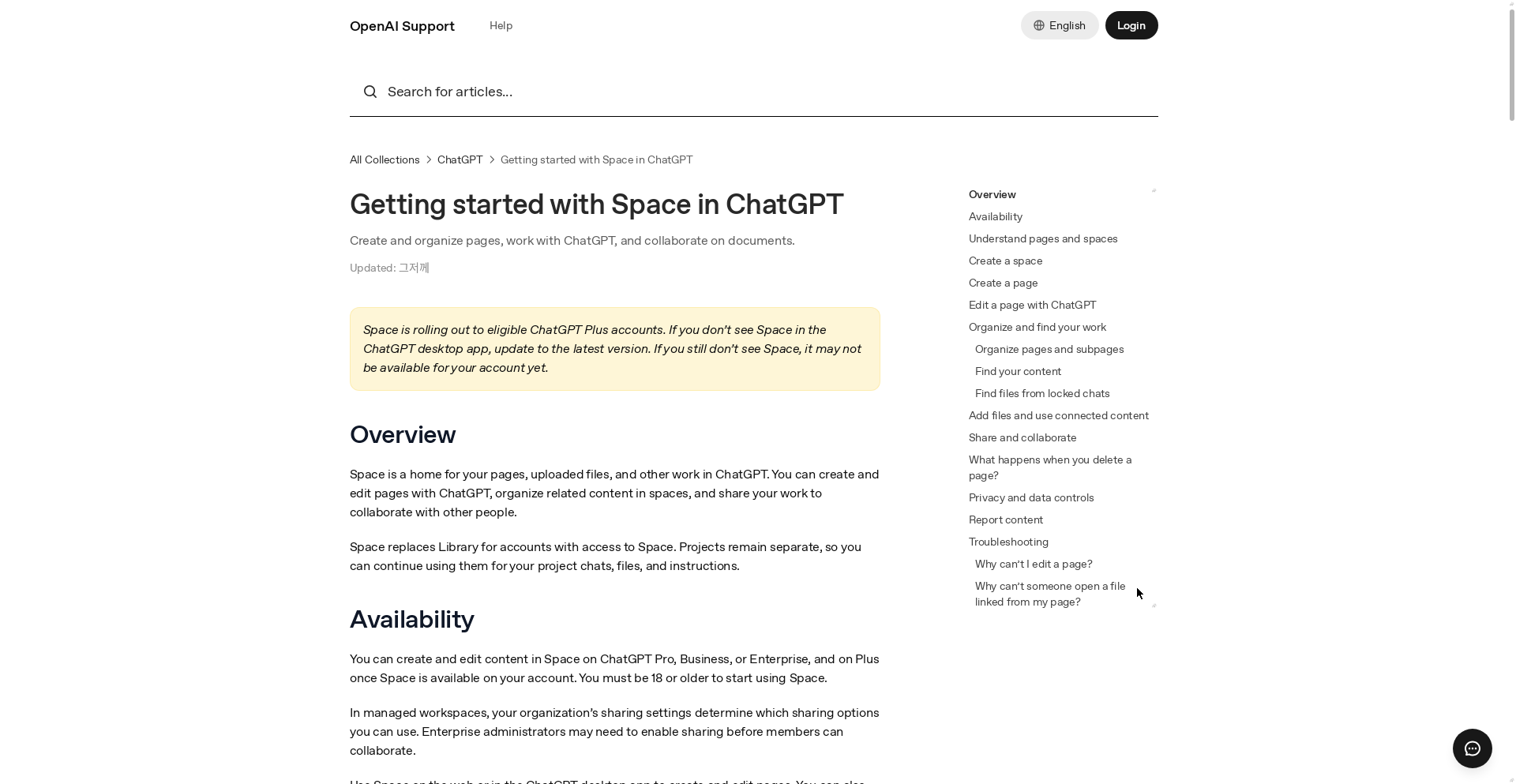
The most common question is how Space relates to Projects. According to OpenAI's documentation, Space replaces Library in the sidebar but leaves Projects untouched.
| Category | ChatGPT Space | Projects (Existing) |
|---|---|---|
| Sidebar role | Replaces Library |
Kept separate from Space |
| Core units | Pages, subpages, folders, slides | Chats, files, project instructions |
| Collaboration | Supported (view/edit roles, @ChatGPT comments) |
Individual project workspace |
| Connected app sync | Auto-updating pages and slides from connected apps | Manual chats and file uploads |
| Mobile support | View, edit, and share on iOS & Android | Supported on iOS & Android |
In short, Projects groups chat threads sharing common instructions and files, whereas Space is a structured workspace for living documents and decks. This shift toward structured agent-assisted workspaces echoes the workflow covered in our Multica team workspace guide.
Key limitations and privacy rules for Plus users
Expanding Space to Plus does not unlock every tier-top feature equally. Four boundaries stand out in OpenAI's Help Center docs and Engadget's coverage:
- No public links or Free-tier viewing: You cannot generate an open web link for a Space page or slide deck. Invited viewers must sign in with a Plus, Pro, Business, or Enterprise account that has Space access; Free users cannot open shared pages.
- No Dots agents on Plus yet: As Engadget reported on November 20, Plus users cannot attach personal
Dotsagents to Spaces yet, as OpenAI only began testing Dots with a small group of Plus users on November 19. (Sheetsis also listed as coming soon.) - Linked file permissions stay separate: Files uploaded directly into a page inherit that page's permissions, but links to external services or files stored elsewhere do not automatically grant access to the original file. Conversely, anything copied or summarized onto the page becomes readable to everyone with page access.
- Memory and training follow the viewer: Even if you turn off Memory and model training on your own account, a collaborator who has Memory or training enabled and uses their ChatGPT on your shared page can cause page content to be remembered or used for training under their settings. (Business and Enterprise data are excluded from training by default.)
Toris's take
If you are a solo builder or a small team where everyone already pays for ChatGPT Plus or higher, replacing Library with Space pages is worth trying immediately—especially for living project briefs and checklists synced with connected tools like Slack, alongside visual assets such as those in our Gemini GIF creation guide.
However, if you need to share documents with clients on Free accounts or publish public links, Space cannot replace Notion, Google Docs, or dedicated web publishing like Toris Studio Services. And before pasting sensitive internal data into a shared page, confirm how collaborators' personal training settings are configured.
Sources
Advertisement