Gemini API File Slicing: Read Only the Pages and Cells You Need
How Google's Gemini API file slicing controls (page_options, spreadsheet_options, and media offsets) cut token spend with a 2-step skim-and-zoom pattern.
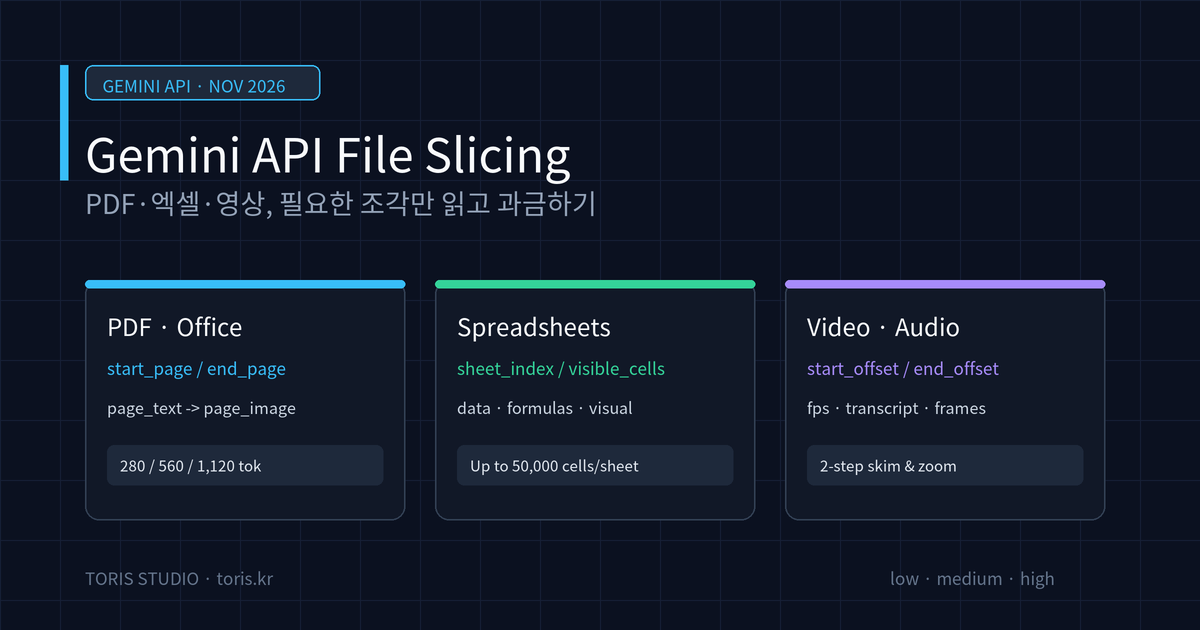
Q. What are Gemini API file slicing controls and how do they cut token costs? They let you upload a PDF, Office/OpenDocument file, video, or audio file once to the Files API and request only specific pages (
start_page–end_page), worksheet tabs/cells (sheet_index,visible_cells), time intervals (start_offset–end_offset), and content layers per turn or tool response. Gemini counts and bills tokens only for the sliced output sent to the model.
⚠️ Accuracy guardrail: This guide is based on Google DeepMind's official announcement (Nov 23, 2026) and Google AI Studio documentation (
Document understanding,Function calling) verified directly on Nov 25, 2026. Partner savings figures (Vercel 14x fewer tokens, LiteLLM 67% on PDFs and 33% on workbooks) are quoted from Google's official blog, and independent latency benchmarks on Korean-heavy documents were not run.
30-second summary
- Server-side slicing without local bloat: Pass PDFs,
.docx/.pptx/.xlsx/.odt/.odp/.ods, audio, and video via a single Files API URI without running LibreOffice, PDF renderers, orffmpegin your client harness. - 2-step Skim & Zoom: Scan cheaply first with
page_textorlowresolution (~280 tokens/page), then zoom into chart-heavy pages athighresolution (~1,120 tokens/page). - Agent-native tool integration: Return a file URI and
processingoptions directly insidefunction_result; Gemini automatically receives total page counts and worksheet names to request follow-up slices across turns. - Supported models and limits: Official docs cover all Gemini 3 and Gemini 4+ models (blog highlights Gemini 4), while full-file upload limits (50 MB, 1,000 PDF pages, 2,000 Office/ODF pages, 50,000 cells per sheet) still apply.
Eliminating client harness bloat with server-side slicing
Previously, ingesting large files forced agent harnesses to spin up LibreOffice, PDF renderers, and ffmpeg locally just to extract pages or frames. That bloated memory, cluttered local disks, and required per-user sandboxes in enterprise deployments.
Announced on November 23, 2026, Gemini API file slicing decouples upload from inspection: upload once via the Files API (free storage, retained for 48 hours) and reuse the URI across turns or inside function_result. Gemini slices, renders, and tokenizes the requested segments server-side in the exact format the model was trained on.
Slicing parameters and defaults by media type
Controls are grouped into page_options for documents/slides, spreadsheet_options for workbooks, and time offsets for video/audio. When processing is omitted on Gemini 4+, documents default to layout-preserving page images (medium resolution, ~560 tokens/page) and spreadsheets include evaluated values, formulas, and sheet names across all tabs.
| Format group | Key options | Content layers | Limits |
|---|---|---|---|
.pdf, .docx, .doc, .dotx, .odt, .pptx, .ppt, .odp |
start_page, end_page, resolution (low/medium/high) |
page_text, page_image |
50 MB max, 1,000 PDF pages, 2,000 Office/ODF pages |
.xlsx, .xls, .ods |
sheet_index (1-indexed), visible_cells (e.g. A1:H50), resolution |
data, formulas, visual |
Up to 50,000 cells per sheet |
| Video | start_offset, end_offset, fps, resolution (low/high) |
transcript, frames, audio |
Standard Files API size & duration limits |
| Audio | start_offset, end_offset |
Audio interval clipping | Standard Files API size & duration limits |
Note that start_page or sheet_index values <= 0—or a sheet_index exceeding the sheet count—return 400 INVALID_ARGUMENT, whereas end_page past the last page is automatically clamped.
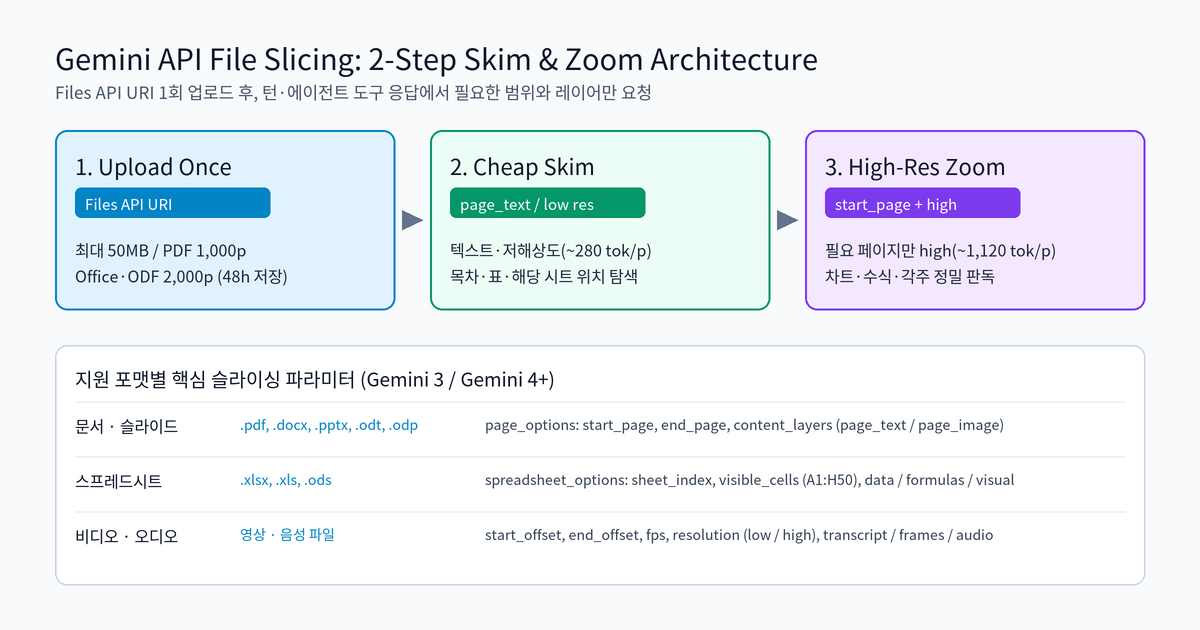
Two-step Skim & Zoom and token billing
For dense reports, the most cost-effective pattern is a two-step skim-and-zoom flow. On Gemini 4 and Gemini 3 models, page images consume roughly 280 tokens (low), 560 (medium), or 1,120 (high) per page, while Gemini 2.5 uses a flat 258 tokens per page.
from google import genai

client = genai.Client()
doc = client.files.upload(file="quarterly_report.docx")

# Step 1: Skim the whole document cheaply as extracted text
skim = client.interactions.create(
    model="gemini-4-hydrogen",
    input=[
        {
            "type": "document",
            "uri": doc.uri,
            "mime_type": doc.mime_type,
            "processing": {
                "type": "static",
                "page_options": {"content_layers": ["page_text"]},
            },
        },
        {"type": "text", "text": "Which page has the revenue bridge chart?"},
    ],
)

# Step 2: Zoom into page 3 at high resolution
detail = client.interactions.create(
    model="gemini-4-neon",
    input=[
        {
            "type": "document",
            "uri": doc.uri,
            "mime_type": doc.mime_type,
            "resolution": "high",
            "processing": {
                "type": "static",
                "page_options": {
                    "start_page": 3,
                    "end_page": 3,
                    "content_layers": ["page_image"],
                },
            },
        },
        {"type": "text", "text": "Read the revenue bridge chart and footnotes on page 3."},
    ],
)
Q. After skimming, how does the agent know which pages or sheets exist next? Whenever
processingis set, Gemini automatically receives total page counts and worksheet names alongside the slice, allowing the agent to request follow-up ranges across turns without extra metadata tools.
Early partner adoption and workflow impact
Launch partners reported immediate token reductions in production harnesses. Vercel observed 14x fewer tokens when skimming a page for text extraction compared to rendering the full PDF, while LiteLLM measured 67% lower prompt tokens on PDFs and 33% lower on workbooks with zero extra gateway configuration.
Combined with modern agent SDKs like OpenAI Agents SDK v1.0.0-alpha.1 and Claude Code Auto Mode, teams can drop fragile local rendering sandboxes and let models inspect only the slices they need.

Toris's take
If your agents process multi-tab .xlsx models, long PDF contracts, or lengthy recordings, now is the right time to retire client-side pdf2image, LibreOffice, and ffmpeg slicing code in favor of Files API URIs with processing controls. Splitting calls into page_text skim followed by targeted high-res page_image reads delivers both accuracy on charts and predictable token spend.
On the other hand, archives exceeding 50 MB or 1,000 PDF pages—and semantic retrieval across thousands of files—still require your own chunking and vector indexing pipeline. Basic input hygiene such as rotating pages properly before upload also remains on the developer side.
Sources
Advertisement