Google Antigravity MCP Apps: Interactive UIs Inside Your IDE
A practical breakdown of Google Antigravity MCP Apps (SEP-1865), the four UI entrypoints, host limits, and getting started with /mcp-app-development.
Summary
Q. What are Google Antigravity MCP Apps and how do they differ from standard MCP tools? While standard MCP tools return plain text or raw JSON, MCP Apps build on the open SEP-1865 (
io.modelcontextprotocol/ui) specification so any MCP server can render an interactive HTML interface (ui://) alongside text output. Google Antigravity adds optional extensions (com.google.antigravity/ui) to display those views not only inline in chat, but also in the side panel, full-page sidebar views, and custom file viewers.
⚠️ Accuracy guardrail: This guide was verified directly against the official Google Antigravity blog post (published November 24, 2026), the Antigravity MCP Apps documentation, and the upstream SEP-1865 specification as of November 25, 2026. Interactive
ui://rendering requires Antigravity App v2.34.0+, while non-UI hosts such as theagyCLI fall back to plain-textcontent. Host limits may change in future releases.
30-second summary
- Open standard + Antigravity entrypoints: Standard SEP-1865 (
io.modelcontextprotocol/ui) apps run out of the box, andcom.google.antigravity/uilets you target the side panel, sidebar full-page canvas, or file extensions. - Four UI surfaces: Inline in chat (
_meta.ui.resourceUri), side panel (aux_pane), full page (global), and custom file viewer/editor (file). - Launch ecosystem: Better Stack, CodeRabbit, Datadog, monday.com, Qodo, and Vercel already ship MCP Apps in the Antigravity Marketplace.
- Built-in scaffolding: Running
/mcp-app-developmentinside Antigravity scaffolds a single-file HTML UI, MCP server, andmcp_config.json.
Why render HTML UI inside the IDE instead of raw JSON?
When an agent receives raw deployment logs or time-series latency data as plain text, the model spends extra tokens reformatting it into prose or Markdown tables. MCP Apps let a tool pair its structured data (structuredContent) with a sandboxed HTML resource (text/html;profile=mcp-app) rendered directly inside the workspace.
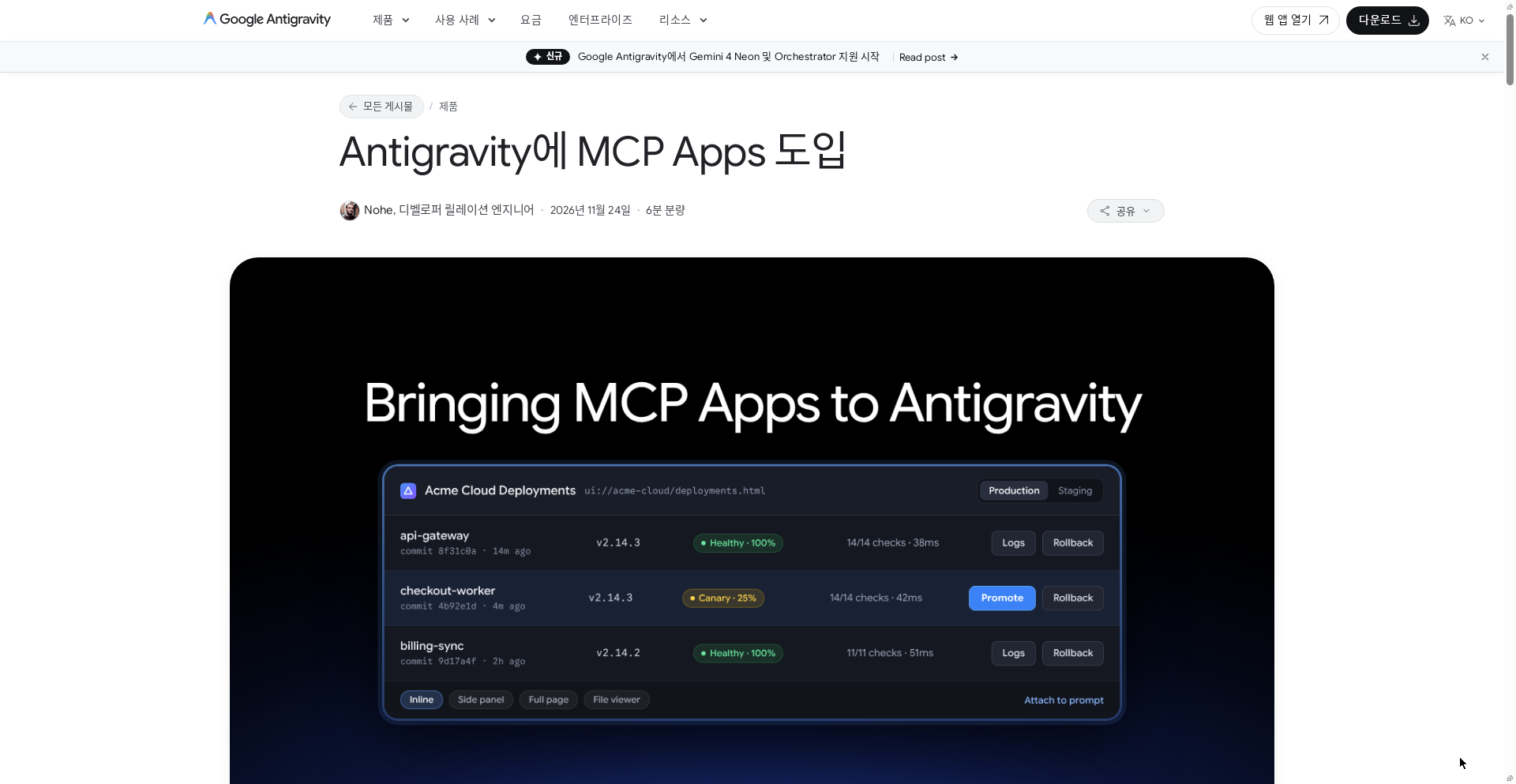
For example, the Vercel MCP App turns a plain-text open_deployments call into an interactive Preview Deployment card inline in chat, lets you attach the preview URL straight into your next prompt, and spins up a live shared Vercel Sandbox Desktop to test desktop and mobile widths side by side. Likewise, Datadog and Better Stack render live latency spike charts right next to the agent's diagnosis.
Across the broader MCP ecosystem—as covered in Claude Skills over MCP, Tasks, and Elicitation and Canva MCP GA Guide—MCP servers are evolving from thin API wrappers into complete interactive workspaces.
The four rendering surfaces and when to use each
Antigravity determines where a ui:// resource opens based on _meta declarations on the tool. For one-off charts or prototypes in a single thread, Antigravity recommends /generative_ui; for reusable UIs backed by a live MCP server, use MCP Apps.
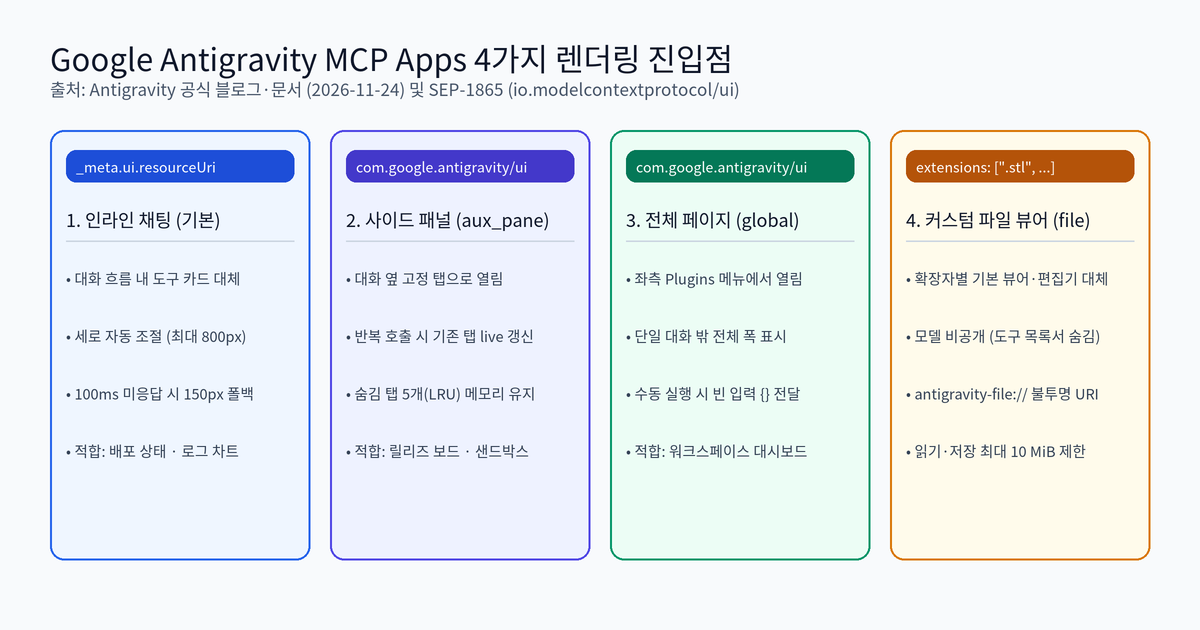
| Surface | Declared with | Behavior in host | Best fit |
|---|---|---|---|
| Inline in chat | _meta.ui.resourceUri |
Replaces the collapsed tool step card inline and auto-resizes vertically (up to 800 px, 150 px fallback) |
Deployment status cards, metric charts, checklists |
| Side panel | aux_pane |
Opens as a persistent tab beside chat; repeat calls update the tab in place, keeping up to 5 hidden tabs (LRU) in memory | Release boards, live sandboxes, diff views |
| Full page | global |
Registers under Plugins in the left sidebar and opens full-width outside any single thread (manual launch passes {}) |
Workspace dashboards, catalogs |
| Custom file viewer | file (extensions required) |
Replaces the built-in viewer for matching extensions; hidden from the model and uses opaque antigravity-file:// URIs |
.stl 3D meshes, schematics, custom file editors |
In particular, the file entrypoint enforces strict path isolation. Tools with a file entrypoint are unconditionally hidden from the model regardless of visibility, and Antigravity passes an opaque per-view antigravity-file:// URI instead of the real filesystem path. Local save-back is only enabled when hostContext["com.google.antigravity/resources"]?.write is present and goes through com.google.antigravity/resources/write.
Six host limits to check before building
Q. Can an MCP App iframe fetch arbitrary external APIs or persist state in browser localStorage? No. Antigravity runs every
ui://view inside an isolated iframe with a default-deny Content Security Policy and no persistent browser storage. Google recommends routing data reads and writes throughtools/callon your own MCP server rather than relying onconnectDomains.
Key host limits documented for Antigravity include:
| Limit | Value | Practical design note |
|---|---|---|
| HTML & file size | 10 MiB max |
Applies to both ui:// HTML documents and antigravity-file:// reads/writes |
| Persisted tool result | 1 MiB max |
Upper bound for CallToolResult stored on trajectory steps; load larger payloads via app-only tools |
Concurrent tools/call |
4 per view |
Scoped to the owning MCP server; in-flight calls abort when the view closes |
| Hidden background frames | 5 (LRU) |
Hidden aux_pane and global frames stay mounted in memory up to 5 tabs |
| Inline card height | 150 px fallback / 800 px max |
Falls back to 150 px if no size-changed arrives within 100 ms; taller content scrolls internally |
| Teardown notification | Not sent | Antigravity does not send ui/resource-teardown on close, so persist edits eagerly |

You also need to account for Antigravity CLI (agy). The CLI connects via mcp_config.json without mounting iframes, ignores _meta.ui.visibility (exposing all tools to the model), and reads plain-text content directly. Always return clear plain-text content alongside structuredContent so non-UI clients work cleanly.
Getting started in minutes with /mcp-app-development
To try existing plugins, open Customizations > Marketplace in Antigravity and install Better Stack, CodeRabbit, Datadog, monday.com, Qodo, or Vercel. If you want to build your own plugin or custom file viewer, run the built-in scaffolding skill:
/mcp-app-development Build an MCP App plugin for Antigravity that tracks release checklist items inline in chat and in a side panel board using @modelcontextprotocol/ext-apps.
When building manually with @modelcontextprotocol/ext-apps, bundle a single-file HTML view (text/html;profile=mcp-app), wire up local stdio (${PLUGIN_ROOT}, ${PLUGIN_DATA}) or remote Streamable HTTP (serverUrl) in mcp_config.json, and validate locally with agy plugin validate --strict followed by agy plugin install. Because ui:// resources are fetched fresh on every mount, closing and reopening a view picks up HTML changes immediately.
Toris's take
If your agent tool returns complex state, charts, or interactive controls that feel cramped in Markdown tables, Antigravity MCP Apps are worth adopting now. For one-off visualizations, stick to plain text or /generative_ui.
- Start with inline cards (
_meta.ui.resourceUri): They fit deployment cards, CI summaries, and latency graphs best because users see them directly in the conversation flow. - Move iterative boards to
aux_pane: Updating a single docked tab in place prevents chat threads from filling up with duplicate cards across multi-step agent runs. - Keep plain-text fallbacks and watch the 1 MiB limit: Return readable
contentforagyCLI and non-UI hosts, and offload large datasets intovisibility: ["app"]tools.
Frequently Asked Questions (FAQ)
Q. Do I need to rewrite an existing SEP-1865 MCP App server for Antigravity?
No. Standard SEP-1865 (io.modelcontextprotocol/ui) servers work out of the box without code changes; you only add _meta["com.google.antigravity/ui"] if you want aux_pane, global, or file entrypoints.
Q. Which Antigravity version is required?
Interactive ui:// views render in Antigravity App v2.34.0+ when the host advertises capabilities.extensions["io.modelcontextprotocol/ui"].
Q. Can the AI model see raw local file paths in a custom file viewer?
No. Tools with a file entrypoint are hidden from the model regardless of visibility, and Antigravity uses an opaque antigravity-file:// URI mediated by the host.
Sources
Advertisement